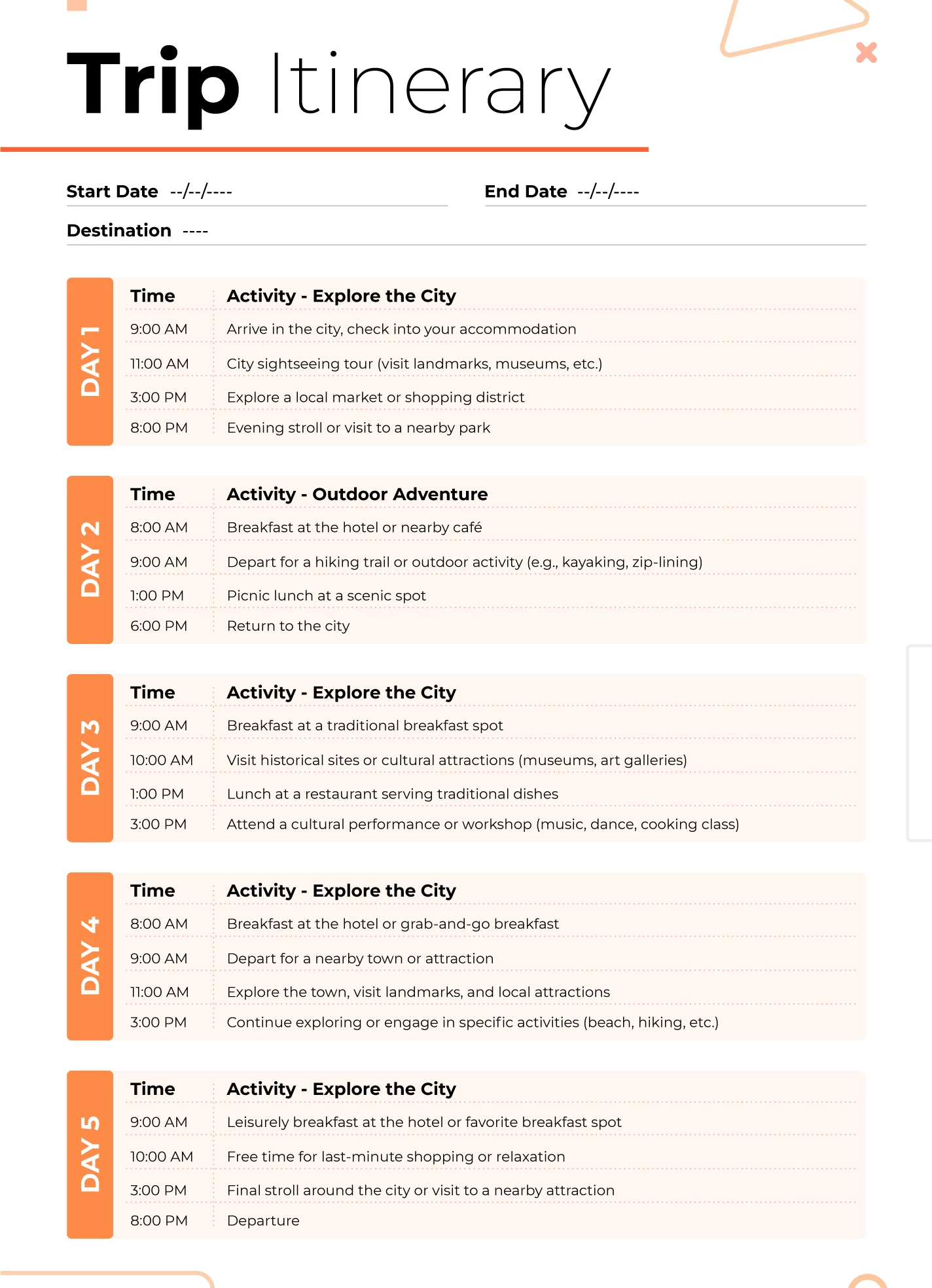
Travel Itinerary Template Google Sheets: A Simple Way to Plan Trips Better
Planning a trip can be exciting, but it can also become messy very quickly. Flights, hotel bookings, daily activities, restaurant ideas, transportation details, and travel budgets can all get scattered across emails, notes, and screenshots. That is why many travelers look for a travel itinerary template in Google Sheets. It gives you one organized place to manage everything, and because it is cloud-based, you can access it from almost anywhere.
A travel itinerary template Google Sheets users rely on can make a huge difference when planning a solo trip, family vacation, business visit, or group getaway. Instead of switching between multiple apps and documents, you can keep your entire travel plan in one spreadsheet. It is easy to update, simple to share, and flexible enough to match different travel styles.
What Is a Travel Itinerary Template in Google Sheets?
A travel itinerary template in Google Sheets is a spreadsheet designed to organize all the important details of a trip. It usually includes sections for travel dates, flight times, hotel information, transportation, activities, budgets, and contact details. Some templates are very basic and focus only on daily scheduling, while others are more detailed and include packing lists, expense tracking, and reservation numbers.
The biggest benefit of using Google Sheets is convenience. Since the file is stored online, you can open it from your laptop, tablet, or phone. If you are traveling with friends or family, everyone can view the same plan in real time. This helps avoid confusion and makes coordination much easier.
Unlike paper planners or static documents, Google Sheets is flexible. You can add extra tabs, color-code your plans, sort activities by time, and edit the document whenever something changes. That makes it a practical choice for modern travelers who want both structure and flexibility.
Why Google Sheets Is Great for Travel Planning
Many people choose Google Sheets because it is easy to use and highly customizable. You do not need advanced spreadsheet skills to create a useful itinerary. A few simple columns and rows are often enough to build a clear trip plan. You can create sections for each day, list the time of every activity, and add notes for things like booking confirmations or local directions.
Another major advantage is collaboration. If you are planning a trip with a spouse, friends, coworkers, or extended family, everyone can access the same itinerary. Instead of sending updated versions back and forth, all changes happen in one place. This is especially useful for group trips where plans may change often.
Google Sheets also works well for travel budgeting. You can create a separate tab for expenses and keep track of hotel costs, food spending, transport, and entertainment. This makes the spreadsheet more than just a schedule. It becomes a full travel planning system that keeps your trip organized from start to finish.
What to Include in a Travel Itinerary Template Google Sheets File
A good travel itinerary template should be simple enough to use quickly but detailed enough to hold the information you actually need. Most travelers begin with a trip overview section. This usually includes the destination, travel dates, names of travelers, and emergency contact information.
The next important section is transportation. Here, you can list flights, train schedules, car rentals, airport pickup details, and booking numbers. Having this information in one place saves time when you are on the move. Hotel or accommodation details should also be included, such as the address, phone number, check-in time, check-out time, and reservation code.
The daily itinerary section is usually the most helpful part of the sheet. This is where you organize each day of the trip by time, location, and activity. You can include tours, sightseeing plans, restaurant reservations, shopping stops, or rest time. Some travelers also add a budget tab, packing checklist, and notes tab for ideas they do not want to forget.
How to Create a Travel Itinerary in Google Sheets
Creating a travel itinerary template in Google Sheets is easier than many people think. Start by opening a blank spreadsheet and naming it based on your trip, such as “Dubai Vacation Itinerary” or “New York Family Trip Plan.” Then create a few main tabs. A common setup includes one tab for trip overview, one for daily itinerary, one for bookings, and one for budget tracking.
On the daily itinerary tab, add columns like date, time, activity, location, booking details, and notes. This makes it easy to scan your day quickly. You can also use colors to separate travel days, hotel stays, sightseeing days, or special events. Simple formatting can make the document much easier to read while traveling.
For the bookings tab, include all the main confirmations in one place. Flights, hotels, car rentals, tour tickets, and restaurant reservations can all go here. If needed, you can paste links or reference numbers into the cells. That way, you always know where to find the details.
Best Tips for Using a Google Sheets Travel Itinerary
A travel itinerary is most useful when it stays practical. Do not overload the sheet with unnecessary details. Focus on the information that will genuinely help you during the trip. The goal is to stay organized, not to create a document that feels overwhelming.
It is also smart to make the spreadsheet mobile-friendly. Since many travelers check plans on their phones, keep your layout clean and easy to scroll. Avoid too many tiny columns or crowded notes. A clear format will be much easier to use at the airport, in a taxi, or while walking around a new city.
Another good tip is to download an offline copy before you travel. Although Google Sheets is online, internet access may not always be available. Having an offline version can be extremely useful when traveling internationally or in areas with weak signals.
Final Thoughts
A travel itinerary template Google Sheets users can customize is one of the best tools for modern trip planning. It helps keep flights, hotels, budgets, and daily activities in one place, making travel smoother and less stressful. Whether you are planning a short weekend break or a long international adventure, using Google Sheets gives you flexibility, organization, and easy access from anywhere.
The best part is that you can build the template exactly the way you want. You can keep it simple, or turn it into a complete travel dashboard. Either way, a well-made Google Sheets travel itinerary can help you spend less time searching for details and more time enjoying the journey.